google.com, pub-1990720073119592, DIRECT, f08c47fec0942fa0 Technology Bank: December 2023

Thursday, December 28, 2023

LCD TV Panel Repairing Books

 World No 1 Panel Bypassing ebooks 


Old Price 55 USD 

Writer Imran Ashraf

He is an expert in LCD LED TV PANEL and electronic repair and has written several books on LCD TV panel repair, including LCD LED TV Panel Bypassing Guide, LCD LED TV Repairing and Screen Bypassing, Master LCD LED TV Repairing and Screen Bypassing Hindi version

Discount Price 

Buy Now With PayPal only just 20 USD American Dollar 

Imran Ashraf Panel Repair Top Ranking eBooks For LCD LED TV Repair 

Check Video for More Information 


Learn how to repair Panel failures,T-con problem in LCD LED TVs with comprehensive guide line with Schematics and Pictures of Problems, This eBook (PDF) or (Doc)format was written for Advanced Level of Technician of LCD LED and Plasma TV repair and includes many Bypass method. If you want to become expert in this filed of LCD LED TV repair  than this is a good eBook for you. Maybe you have a broken LCD TV sitting at home or your workshop and you want to repair it quickly. No Problem who you are or what your reason is for wanting to repair LCD or LED TVs you have come to the right place.Once you have complete your purchase you will be sent a link to download a copy immediately.
Volume 1 ,
Volume 2 ,

Ebooks Preview 


Ebook Format .Doc and PDF

Complete Knowledge of Screen Voltages 

How to Bypass Cof Voltages and other Data

Cof Data Collection Available 

Fault like Slow Motion Picture Problem

Ghost Image Problem

No Image Problem Backlight Ok

Backlight OK But No Picture Problem

Dabble image Problem

Negative Type Picture Problem

Picture Solarization Problem

Vertical Bars Problem

Horizontal Bars Problem

White Image Problem

DC DC Voltages Chart

VGH VGL AVDD Vcom VCC Voltages Guide

How to Bypass tracks to Side Cof 

Complete Knowledgeable Guide Book

For New Technician's 

For CRT TV Repair Technician's

For LCD TV Technician's 


INCLUDING 2 Bonus Ebook 

SMD CODES GUIDE E-BOOK 

Backlight Bypassing Guide & Modifications E-BOOK 


LCD/LED पैनल रिपेयर करने केलिए विवरण हमको ब्लॉग में, सर्विस मैन्युअल में, इंटरनेट पे मिलते हे ,लेकिन हमको सभी जगहों पर पहुँच नहीं सकते, हमें एक साथ सभी विवरण मिलता तो बहुत अच्छा होगा,  ebooks of Lcd Led Tv Bypassing Methods में पैनल का बहुत सारा विवरण  दिया हुआ हे,मेरे को यकीन हे ये  हमारे दैनिक जीवन में मदद करेंगे , ये बुक आपको ऑनलाइन पे भी खरीद सकते हो, इसकेलिए आप ये वेबसाइट पे जाने का हे  
  www.electronics-tricks.blogspot.com


പാനൽ നന്നാക്കുവാൻ സഹായിക്കുന്ന ഒരുപാട് കാര്യങ്ങൾ ഇന്റെർനെറ്റിലും ,ബ്ലോഗുകളിലും ,സർവീസ് മാനുവലുകളിലും  ഉണ്ടെങ്കിലും നമുക്ക് എല്ലാ സ്ഥലത്തും എത്തിപെടാൻ ബുദ്ധിമുട്ടാണ് ,അങ്ങനെയുള്ളപ്പോൾ  നമുക്ക് ആവശ്യമുള്ള പാനൽ സന്ബന്ധമായ ഒരുപാട് കാര്യങ്ങൾ  കോർത്തിണക്കി കൊണ്ടുള്ള ഒരു പുസ്തകമാണ് ebooks of Lcd Led Tv Bypassing Methods 
 ഇതിന്റെ ഉള്ളടക്കം നിങ്ങള്ക്ക് ഉപയോഗത്തിൽ വരുമെന്നതിന് സംശയം ഒന്നും തന്നെ വേണ്ട.ഈ ബുക്ക്‌ വാങ്ങുന്നതിന് വേണ്ടി ഓണ്‍ലൈൻ വഴി പണം അടക്കാം, അതിനു വേണ്ടി  പേജ് സന്ദർശിക്കുക 
lcdledebooks@gmail.com


Book Index

1.       My Special Request

2.       COLLECTION OF TRICKS & HOW-LED LCD TV SERVICE FROM VARIOUS SOURCES RELIABLE TECHNICIANs.

3.       L.C.D L.E.D T.V Panels Connection and Voltages Understanding.

4.       Brief Details of Panels Connection Points.

5.       Brief Details of Panels Connection Points.

6.       Test Case “Ghost Image with slow motion”

7.       Understanding the Tab, COF, and T-BGA

8.       Types of panels.

9.       Panel Cut-Circumcision.

1 0.   Example of TCP.

1 1.   Bonding Machine for installing New Tab COF I.Cs.

1 2.   Symptom: Have audio but No Picture and black screen.

1 3.   Symptoms: A white screen.

1 4.   Example voltage timing control circuit.

1 5.   Philips LCD Panel Production QUANTA DISPLAYS Problem.

1 6.   Self Monitoring System of LCD LED TVs’.

1 7.   Study Case Panel failure of LCD-TV Samsung guide.

1 8.   Here we show you different type of panels and Modifications.

1 9.   When you try to Modify LCD Panels you should know the Basic knowledge of these connection as I mention.

2 0.   Samsung Fault: Braking out with periodic disappearance and falling in inhibiting vertical colored stripes.

2 1.   Symptoms: when you turn on a dark gray background how to solve.

2 2.   Fault: 3/4 bottom image shows the distortion, the top band is the norm.

2 3.   Defect: The screen is divided almost in half, top normal, low distortion.

2 4.   HOW TO DIAGNOSE A FAILED T-CON BOARD - HOW TO REPAIR A T-CON BOARD.

2 5.   T-Con board AS-15HG problem.

2 6.   Bad Gamma Correction Examples with cure.

2 7.   Another Problem of AS-15-F IC in Sharp LCD TV with by pass method.

2 8.   Problem SANYO 42CA8Z Blurry images or blur increasingly graying faintly visible image,

2 9.   Understanding of  LVDS cable failures.

3 0.   SAMSUNG UN40C5000QFXZA  TROUBLESHOOTING VIDEO PROB-LEMS.

3 1.   Green lines or a green screen defective main board , LVDS , or T-CON.

3 2.   Toshiba LCD 32AV Horizontal distortion.


33.   Samsung Defect: low-contrast negative image with a blue-green moiré.


34.   FAILURE: When the screen is dark then (1 min) horizontal bars passing through a couple of minutes in the 1-3 inch vertical column. By pass

35.   Samsung LE32B450C4WXRU Purple color all over the screen also when you try to enter the setting manually.

36.   Horizontal stripes Panel Number T#######VC V by pass.

37.   Problem low contrast, whitish image by pass.

38.   secrete of LED Panel CLAA####FA04S By pass.

39.   SAMSUNG LE26C350DW SAMSUNG LE32C350DW Panel by pass.

40.    LCD TV Use Panel V####B1-L01 T-CON V315B1- by pass.

41.   #Problem: Bands appear immediately after switching on the power supply…By Pass.

42.   #Panel LC420WX5 Used in Many LCDs TVs’ LG, PHILIPS By pass.

43.   #SAMSUNG LTA320WT-L05 by Pass.

44.   Panel Samsung LTA320W####2-L13, By Pass.

45.   #Samsung LE32R71 picture distortion like net all over the picture.

46.   #SHARP LC  Models ,LC  Model P50-70 By pass.

47.   Photos defects panel Not Repairable.

48.   Fault occurs defective discharge.

49.   #Samsung LTA3##0WT-0 Problem is the failure of the backlight (CCFL).

50.   #LG model15LS1R CL-81.Fault Menu does not appear correctly.

51.   LG LCD 22##C30 Plain White Screen.

52.   Frequent vertical stripes in the image across the screen Solution Problem.

53.   Fault: lay in the fact that when the image appeared in just 30 seconds, the red almost was not.

54.   FAULT : Trouble- 5 to 20 minutes (cold) a horizontal bar moves vertically then another and another, 10 seconds through out completely disappears, the problem occurs only with a tuner, AV on all normal.

55.   #SONY BRAVIA Absolutely identical symptoms manifestations malfunction.

56.   KDL46X3500 UNEVEN BACKLIGHTING Defect:  lights in the center of the raster for defects.

57.   Fault: No picture, and sometimes colored vertical thin black horizontal stripes across the screen.


5 8.   LG Fault: The screen is horizontally moved on top of the bottom band image is not visible but the graphics is visible clearly.

5 9.   #SAMSUNG LE32S81.Fault: Slowly illuminates the image, turning into two part.

6 0.   PHILIPS26PF9946/12, CHASSIS AND LC4.2E PHILIPS color stripes at half of 1/3 .

6 1.   #HITACHI 37LD9000TA Problem: Stripes, ghost pictures…

6 2.   #SAMSUNG LED TV LE42D50#0 Fault:  Noise bar on picture of every input.

6 3.   #TV LG #42PX3RVA-ZC MF Problem: Plasma with green stripes in the form of image noise.

6 4.   #PANEL# V400H1-L12 REV1 TCON V400H1 PETAL NT39530H-C5208A Driver 1138 AA-A521AT Common Problem of this types of panel you should Test and jump these connection as we shows.

6 5.   #Sony Barvia Defect The image is not clear with horizontal stripes.

6 6.   #Panel M260TWR1 Modification.

6 7.   #V315B3-L04 Panel Connection.

6 8.   #PANEL LTF400HA03 APPENDIX I33VVBC-X01. MAJOR OPEN CONNECTION By pass.

6 9.   #Panel V260B1 Major Problem by pass.

7 0.   Sony Came to malfunction doubles the image vertically and "banding" in the upper part of the image by pass.

7 1.   #SAMSUNG PANEL LTA320WT-L05 By pass.

7 2.   PANEL T370XW02 V.5   TCON T370XW02 V.5 CB By Pass.

7 3.   #PANEL LTY460HB08 460HBSR2LV1.1 by Pass.

7 4.   #LTA320WT-L15, STRAP 320WTSL4LV0.0 by Pass.

7 5.   #Test Case LC420WUD-SBM2 read care fully.

7 6.   #Panel LC420W02 by pass.

7 7.   #Panel P-MOD 46M1T by Pass.

7 8.   #HT215F01-100 by pass.

7 9.   #Philips 32PF3320/10 Panel CLAA216WA01 by pass.

8 0.   #Panel LC320WUE-SAA1 stands in 32PFL5604 By Pass.

8 1.   #Panel LTA320AB02  T-CON - 320AB02CP2LV0.3,

8 2.   #LTA320WT-LF2 DAEWOO DLP-32C1 by pass.

8 3.   #Panel Samsung LTA320W2-L13, fee T-CON: 320W2C4LV6.4 by pass.

8 4.   #V260B1-L11 and V260B1-by Pass.

8 5.   #Panel LTA320WT-LF2 by Pass.

8 6.   #Philips 32pf5321/12   Bars on picture.

8 7.   #T260XW05 V0. T-con built on the top plate ..by pass.

8 8.   #Panasonic TX-R32LE8.

8 9.   #Chinese fault.

9 0.   #SAMSUNG PS42C91HX_NWT.

9 1.   #Sharp KD603WE01, VCT6973G B3, LCD-module LK315P3LZ10Z green border, as in the image sloping noise bands, with high brightness in light areas in the image goes negative.

9 2.   #SAMSUNG LA46M81B. Panel LTA460HB05 by pass.

9 3.   #Panel AUO T420XW01 #V0 (LCD TV Sharp LC-42PD2RU)  Modify by pass.

9 4.   #Panel AUO T420XW01 #VC stands 42J bars…By pass.

9 5.   #Panel LTA320WT-L06 T-CON #320WTC2LV3.7 by pass.

9 6.   #Panel LC320WUE-SAA1 stands in #32PFL5604, By Pass.

9 7.   #Panel LTA320WT-LF2 by pass.

9 8.   Model Samsung LE37M87BDX/BWT -Matrix T370HW02 v.2 by pass. 

9 9.   #Panels CLAA215FA and #panel - CLAA215FA04 by Pass.

1 100.                        PANEL T370HW02 V1 by pass.

1 101.                        T260XW04 V.3 Pads RM76180FC-086 driver 06B019CCA1 by pass.

1 102.                        Panel LG LC470WUE by pass and much more,

1 103.                        List of Test Cases Faults for LCD and LED TVs.

1 104.                        List of LCD,LED TV Factory Reset and Service modes.

1 105.                        Software Information.

1 106.                        Power supply repairing

1 107.                        Main board repairing.

1 108.                        Inverter and Blaster repairing and by pass.
T con Board Information


TP.HV553.PC821

   TV Model IMPEX  GLORIA 58 SMART

   Main Board TP.HV553.PC821

100% Working and Tested Firmware are Available

Firmware Can Solve These types of problem

1: TV Hang or Stuck On Logo or WisdomShare Stuck issue solved .

2: Applications are Stop Working Solve

3:DeBug Your Firmware

4: Password 🔑 Locked Flash 


IMPEX GLORIA Model Firmware Successful Installation Screen Shots


Firmware Buy Now 


Other Brand Firmware also Available 

For models

StarGold

Magic

Nobel

Samsung

IKON 

IMPEX

Hyundai

Nikai


JUC7.820.00237309

 Classpro Matching Firmware For Model Number EGS55UHD, EGS65UHD With Same Remote Working Available 

Main Board Number JUC7.820.00237309 Firmware 

Upgrade Version 9 to Version 11

USB Upgradeable Firmware Available in 20 USD international Price 


Buying Link PayPal 20 USD Buy Now

Buying PayPal Price 20 USD

Problem Solution: LED TV Stuck On Main Logo

LED TV Freez and Stuck Not Coming on main Window


Firmware Upgrade Version 9 to Version 11

Google Update

Google GTV Apps Update 


Remote Control Stop Working


Restart LED TV During Working 


In this kind of problems you need to install Fresh Firmware for Debugging 


Firmware Available it's cost 15 USD 

In Pakistani Currency it's Cost 4500

Contact 

Imran Ashraf

+923139292880


CV6683H-C42 Tested Working firmware for LCD/LED TV main board are Available

Call +923139292880


https://electronics-tricks.blogspot.com/2023/09/juc782000243914.html?m=1

LCD Panel Short Killer Guide

  بِسْمِ اللهِ الرَّحْمٰنِ الرَّحِيْمِ “In the name of God, the Most Gracious, the Most Merciful”


Short Killer Panels


Namely eliminating short paths inside the LCD panel using Short Killer Device from outside
This case is often  told by many technicians
But  it seems like no one has ever uploaded our technique... or maybe no one has ever done it...

Dark screen problem on earless Cof less panels.

Cutting left-right gate-driver lines or left-right isolation......we often find the results  don't work.
So the "short  killer panel" is the last profitable business that you can try.         

For example the Samsung panel.

Look at the picture of the paths that can be found on the SAMSUNG panel without ears on the left and right.
The major lines from top to bottom are lines ckv1, ckvb2, ckv2, ckvb2, vss, stvp
Then there are small soft lines that cross between the lines to a series of Vertical Shift Register circuits. 

To find out if it's short or not then:

  • Cut all Ckv, Ckvb lines on the left and right sides, using Digital AVO in the DIODE CHECK position.
  • Check the resistance between lines (ckv1-ckvb2) and between lines (ckv2, ckvb2). Normal measured resistance is INFINITE (using digital AVO shows "OL")
  • If it shows the ohm value, it means the path is short.


How to shoot the short route.

  • Use Short Killer Device with a voltage between 15v to 30v/5A..
  • Because of the CVK path. ckvb is very soft and close to other lines.....don't shoot directly at the printed line..........the mistake of sticking to another line is the risk of being shot.


  • Attach a cable connection that is long enough on the path that will be shot (it is best to use a soft cable such as used DVD motor email).
  • The ends of the soldered wires at the PCB cuts have holes.
  • Then what we shoot are the ends of the cables that are soldered to  the hollow PCB.
  • Shoot by   shooting.
  • Do it again  if the short remains stubborn.


 Circuit Short Killer Device 

A circuit short killer refers to a device or technique used to identify and troubleshoot circuit shorts in electrical systems.

It helps in locating and fixing the faulty circuit that is causing the short circuit.

Redeem Your Bonus Points of Downloading 

Here are a few common methods used to find circuit shorts:


1.

Visual inspection: Start by visually inspecting the electrical system, including wires, cables, connectors, and any exposed or damaged areas.

Look for any signs of burned or melted insulation, exposed wires, or loose connections.


2.

Circuit breaker test: Turn off all the circuit breakers in the electrical panel and then turn them on one by one.

If a circuit breaker trips immediately after turning it on, it often indicates a circuit short in that particular circuit.


3.

Multimeter testing: Use a multimeter to test the resistance, continuity, and voltage at different points in the circuit.

Compare readings between different components to identify any variations that may indicate a short circuit.


4.

Divide and conquer: If the circuit has multiple devices or outlets, disconnect them all and then reconnect them one by one, testing for a short circuit after each connection.

This helps to isolate the problematic device or outlet.


5.

Short circuit locator: There are specialized tools called short circuit locators or circuit tracers available in the market.

These tools emit a signal that can be traced along the length of a circuit to pinpoint the location of the short circuit.


Remember, working with electrical systems can be dangerous.

If you are not confident or experienced in electrical work, it is recommended to seek professional help from a licensed electrician or technician.


6: Short Circuit Remover Tools

You can remove short circuit in electronics circuit by short killer tools as shown in this pictures 


Dead, means No output and no response on output.

Missing particular voltage.

Voltage fluctuation.

Shorting in the primary section.

Secondary section shorting.
Main Capacitor Blast and weak.

STR Mosfet error.

Blast STR IC.

These are the common fault which we get in the LCD LED TV. Now I will tell you how you can fix this type of fault very easily. I already repair many power supply board. If you want to watch my PSU repairing video click here and learn how I repair power supply and fix the TV.

Repairing Process

DEAD: For dead power supply repairing first of all you have to check all the components. Mostly PSU getting dead when some components getting overheating or burn. Find the bad components and replace them with a new one. Especially mostly time we get a fault in the main STR Transistor which use for voltage switching. And lastly you have to check the feedback Schottky diode. Many times this diode also getting overheat and burn, after that stop the voltage flow. for more information click here.

Missing Particular Voltage: When you get some specific particular voltage is missing in the PSU, you have to check that track. For example from PSU we get many values voltage like 5v, 3.3v, 12v, 24v. If any of this voltage is missing in the LCD LED power supply, check that particular voltage which you not getting from PSU. This type of specific voltage missing problem you fix very easily if you know about tracing the track. Mostly I fixed this type of problem by doing to replace the capacitor and transistor and voltage regulator replacing.

Voltage Fluctuation: This means the output voltage is not stable and not pure DC. To repair this type of fault you have to check the voltage rectification section. Firstly check the main primary section capacitor. Seeing such a rectification problem for this fault. This type of problem also arises because the capacitor is weak. If the capacitor is getting weak simply replace that capacitor. Your LCD LED TV Power supply fluctuation problem will be fixed.

Shorting in Primary and Secondary Section: It is very simple to fix this type of shorting problem. Only you have to find out the sorting components and replace them with a new one. That’s it your power supply will be fixed.

Main Capacitor Blast and weak: High voltage damage in LCD LED power supply is that blast the main capacitor or blast the main STR Transistor. When you open the TV first you will see the capacitor is a blast. This problem only gets when a huge amount of voltage will flow in the circuit. For repairing this problem first change the fuse and capacitor. Before the test the circuit also checks the STR Transistor. Many times STR also effected by the overvoltage input signal.

STR Mosfet error: This is most getting a problem in the LCD LED power supply. If you get 10 Dead LED TV for repairing, 6 will be the STR error problem. In my 12 years of repairing experience I have repaired 1000+ 

Contributor Imran Electronics

Thank You


TP.HV320.PB801

 TP.HV320.PB801 Android Motherboard Firmware Available Free Download


Free Download 


Free Download link 


Free Download 

Problem Solution

Stuck Logo

Screen Freezing at one Screen

Restarting TV 

WiFi not Working

Applications are not working good 


Free Download 

Resolution 1366x768 Samsung IR

Resolution 1920x080 Free Download

Free Download 

Samsung IR Resolution 1920x1080 Free Download 


Installation Guide


How To Update Firmware in TP.HV320.PB801

  1. After downloading the file
  2. You have to extract the rare file
  3. And copy the MstarUpgrade.bin file
  4. Copy it into formated USB Disk
  5. Insert it into TP.HV320.PB801 smart board
  6. Insert the switch into 220v
  7. And after 2 seconds the red indicator, light will start blinking
  8. You have to wait till led light stops blinking
  9. After this, the led light will still be on a red light
  10. You can remove the USB Disk
  11. Now power on the board from remote
  12. and Enjoy! firmware is successfully updated
  13. Imran Ashraf Support 

9632T8E

 9632T8E Original Firmware Available

Mainboard 9632T8E Firmware Available for 50 Screen Also Available for 55 Screen and 65" Size Please Contact +923139292880 WhatsApp Only download link 


Redeem Your Bonus Points of Downloading 

Solve Your Issue If Your TV Behave like this symptoms.

1: Problem Solution Stuck at Main Screen Logo

2:Freez At Logo Screen 

3: LED TV Restarts Again and Again .

4:Solve issue when Restart LED TV when on your WI-FI Option


Workin Remote  for This Mainboard
Firmware 


WhatsApp Number +923139292880
50 Screen Firmware 
Firmware Price 18 USD PayPal


55 Screen Firmware 
Firmware Price 18 USD PayPal

Buying link 


65 Screen Size Firmware

International price 18 USD 


SMD Hot Air Station 878D Repair Video
Error Code E4 Showing


Main Board 6886T8E
Firmware Available
For 65" Screen Size
Sansui LED TV Model UHD
+923139292880
WhatsApp messenger only

Cof Data


9632M5F1

 9632M5F1 Firmware Software Available Tested and Working.


Problem Solution
1: Logo Stuck at Main Screen
2: Main Screen Stuck Problem
3: TV Set Restart When Stuck 
4:Remote Control Works Very Slowly
5: WiFi Not Connecting

International Price is 20 USD 


COF Data Side Cof

 MT3804VC Cof Data


NT39538H-C1272B Cof Data Full Guide Details 


8656N-C540 Cof Data Full Guide Details 


NT39522H-C02H7A Full Cof Data Guide Details 


NT39567H-C5286A Data Guide 


8657D CCBR Cof Data Guide Details 


NT39573H-C6007 Cof Data Guide Details 


NT39538H-C1272B Cof Data Full Guide Details 


8656N-C540 Cof Data Full Guide Details 


NT39522H-C02H7A Full Cof Data Guide Details 


NT39567H-C5286A Data Guide 


8657D CCBR Cof Data Guide Details 


NT39573H-C6007 Cof Data Guide Details 

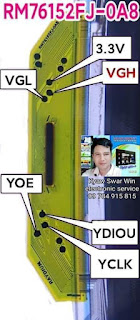
RM76152FJ-0A8 and RM76153FJ-0A1

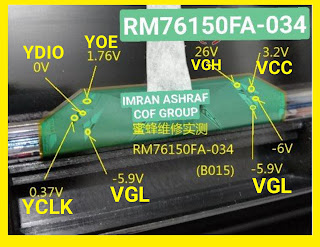
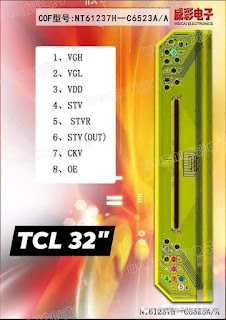
 COF DATA Line Voltages Line

NT39548H-5801A


LS0306M2-C1LX

C5209A

C6517A


C6517A


8656-LC530


RM76320FB-61A


RM76150FA-034


NT39538H-1272A

NT39538H-1272B

ILI5271M2AA1

RM76A30FA-906


SDD3293U


SHARP COF


NT3953H-C5208A

C5201A


NT39538H-1295A


PB17C10B1-T6LC1


NT39547H-C1277A


RM76190FB-0AZ


8656-N C560


NT61237H-C6523A/A


Nt61212H-C6517A/A


8697 B CYA7


NT39329H-CO2A5A


8656 M CY61


PCA8842M6


8697 B C562


NT39567H-C5286A


NT39566H-C5284A


RM76370FC-80K

RM76370FA-80A


NT61227H-C1217B


NT61237H-C6523AA


S6CG208-51


8697 A CY79


RM76152FJ-0A8


8656 M CY45B


8651 CCV1B


EK73510Z004A


EK73535-2011A


NT61305H-C52A3A


ST6232-C01


NT61305H-C52A3A


RM76370FC-80K


8697-BC562


TAPE9522-01-4A


RM76320FB-61B


NT39538H-C1172B


MT3807VB/C

CLAA215F


8656 F CYOB


RM76A30FA-906


NT61212H-C6517A


NT39530H-C5209A


8656 M C607


C6517A-A


8656-LC530

Fault Findings common troubleshooting

With the advancement of science and technology, TVs have changed a lot from the earliest black-and-white TVs to color TVs and now to today's LCD TVs. However, after a TV has been used for a period of time, various malfunctions cannot be avoided. Today I will introduce Here are some repair methods for you if your LCD TV breaks down, let’s take a look!

Welcome to follow the WeChat public account "Hotwater Heater Repair Phone Number" to get more home appliance repair information!


1. TV hardware failure - TV screen is black and there is sound

Solution: Check the plugs on the back of the TV to see if each plug is in a specific position, and confirm if there is any looseness at the socket. If so, just fix it.

After troubleshooting the socket problem, if the black screen of the TV has not been resolved, then it is a hardware problem. At this time, do not disassemble it yourself. You must contact the relevant after-sales maintenance personnel for inspection.

2. The TV screen suddenly goes black and cannot be started.

Solution: Observe the power indicator light of the TV. If the power indicator light does not light up, it means a sudden power outage and a black screen due to a power connection problem. At this time, you can check whether there is a power outage at home, whether the power plug is loose, and whether the power cord is faulty.

If the power indicator light is on, it is a hardware problem. Users who do not understand the specific internal structure of the TV need to contact after-sales maintenance personnel for testing.


3.TV screen blur

Solution: First, measure whether the clock output of the motherboard is normal, then check the motherboard signal RGB, whether there is any soldering or short circuit in the circuit from the input to the main chip, see whether the capacitor and resistor have changed values, then check the motherboard signal, and the output to the screen. Check whether there is any soldering or short circuit in part of the circuit of the connecting socket. If so, please contact a professional for repair in time.

Another situation is that the TV display is broken. At this time, it may be necessary to replace the TV display to solve the problem of TV screen blur. You also need to contact a professional for repair.

4. TV software failure causes TV to freeze or freeze.

Solution: When you find that the TV freezes or stuck you can download TV Assistant from the TV App Store to clear some useless or stolen memory in the TV. Usually, after installing the software, check whether any participating APK installation packages remain in the TV system. Because some software will leave installation packages in the system after automatic upgrades, which need to be cleaned up in time.


5. Unable to install software applications

Solution: Enter the setting options in the TV system, find the corresponding item, and turn on the switch that the TV manufacturer defaults to disable USB installation of TV software, and you can install it through USB. If you find that you cannot install a third-party application, you can find the installation option of the third-party application in the settings and turn on this option to install the third-party software.

6. There is a problem with the TV parsing package

Solution: Since the user did not download the complete installation package during the download process, just re-download and install it again.

If the installation package downloaded by the user does not match the system version of the TV, there will also be problems parsing the package. At this time, the TV system can be re-upgraded and installed again.

The above are the common troubleshooting methods for LCD TVs. To learn more about home appliances, please contact +923139292880 my WhatsApp number.


LCD LED TV Screen Panels Repair Professional EBooks Guide

  #ImranAshraf #LEDTVRepair #COFVoltages #book #imranashrafbook   My new book is coming soon, pre-order it. LCD LED TV Screen Panel Repairs ...